Checklist to Improve Livestreaming Quality and Traffic Efficiency
Livestreaming is an important channel for sellers and creators to do business in TikTok. Operating a high quality LIVE is the key for running long-term business on TikTok. LIVE GMV consists of two parts, traffic (PV) and traffic conversion efficiency. This article will help you to understand traffic efficiency and provide you a checklist to improve it.
How to Measure Traffic Efficiency
- Definition: GPM= GMV/PV *1000 GPM is a metric reflective of traffic efficiency and LIVE quality. GPM measures the average amount of GMV generated every 1,000 times the livestream is shown.
- High GPM means good business: GMV= GPM * PV / 1000
- With the same level of traffic (PV), the higher GPM the higher GMV.
- Higher GPM can also bring more traffic as our algorithm rewards liveroom with good conversion.
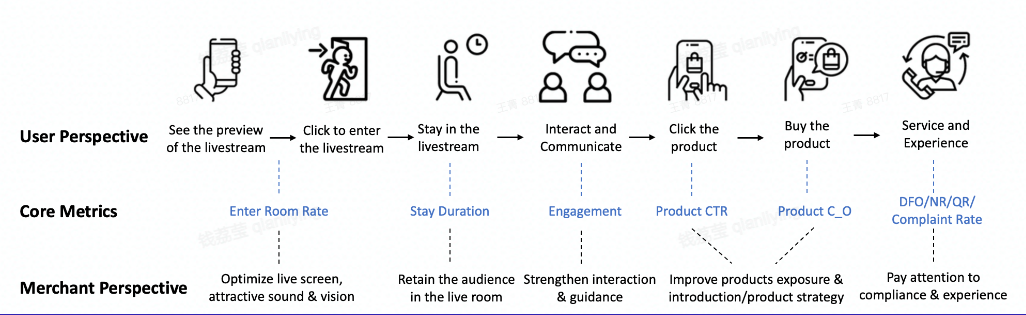
- User Journey perspective:
Checklist to Improve Your LIVE Quality and Traffic Efficiency
How to use this checklist?
- Self check before LIVE: please check the action point and make sure you have done at least the must try actions.
- Review after LIVE: check your live performance on seller / creator center, locate your main problem metrics and find the corresponding action items, check whether you have done all the suggested actions.
- DIY your own checklist: combine the checklist with your category's top LIVE room practices, exercise and summarize your own checklist that works the best to drive your LIVE sales.
| Stage | GPM metrics | Action Type | Action Item | Suggestion |
| Before Live | ERR | Liveroom airdate | Go live at fixed times | |
| Before Live | Overall | Guarantee proper live duration (mainly top sellers/creators) | Must Try | |
| Before Live | ERR | Pre-live post | Publish traffic-driving short videos (related to live) beforehand | Must Try |
| Before Live | ERR | Publish a preview post on other Social Media platforms to announce LS details | ||
| Before Live | ERR | Add next live time info into account name | ||
| Before Live | ERR | Liveroom visual preparation | Set good lighting without over/under exposure | Must Try |
| Before Live | ERR | Ensure live image quality with good / normal pixel | Must Try | |
| Before Live | ERR | Liveroom sound preparation | Ensure no background noise and set voice with proper volume | |
| Before Live | ERR | Set proper background music - moderate volume, fits your LIVE atmosphere | ||
| Before Live | ERR | Liveroom background display | Set neat and organised background | Must Try |
| Before Live | ERR | Ensure liveroom decoration fits the products | Must Try | |
| Before Live | ERR | Ensure clear product display (no blocking) | ||
| Before Live | ERR,CTR | Use sigange / sticker / billboard to display key offers / promotions | Must Try | |
| Before Live | ERR | Liveroom tittle | Set attractive and succinct liveroom title | |
| Before Live | ERR | Liveroom cover page | Set attractive and succinct cover image | |
| Before Live | ERR | Liveroom host apperance | Host styling in line with the product | |
| Before Live | ERR | Host use / wear the shop's top product | ||
| Before Live | ERR | Host can show their personality and sincerity, thus gaining the trust of consumers(esp. for creators) | ||
| Before Live | ERR | Have co-hosts on screen to supplement the atmosphere | ||
| Before Live | CTR,C_O | Liveroom product preparation | Always bind high GPM or top selling products and check stock | Must Try |
| Before Live | CTR,C_O | Bind >=10 products per live | Must Try | |
| Before Live | CTR,C_O | Guarantee price competitiveness | ||
| During Live | ERR | Live interaction | Introduce the LS session every 5min (greeting, key selling point,discount etc) | |
| During Live | CTR | Guide viewers to click the shopping cart | Must Try | |
| During Live | CTR,C_O | Show users how to place an order step by step on the phone | ||
| During Live | CTR,C_O | Encourage viewers to interact through like, follow, share and comment | Must Try | |
| During Live | CTR,C_O | Host be responsive to viewers' questions | Must Try | |
| During Live | CTR,C_O | Host call to action | Must Try | |
| During Live | CTR,C_O | Use interaction voucher, set exclusive benefits for new customer/fans | ||
| During Live | CTR,C_O,AOV | Use promotion tools: voucher, bundle, flash sales, free giveaway (advanced: create limited time offers) | Must Try | |
| During Live | CTR | Liveroom products presentation | Pin product ontime while explaining the product | Must Try |
| During Live | CTR | Host increase the explanation time and frequency of high GPM or top selling products | Must Try | |
| During Live | CTR,C_O | Host explain products features and selling points thoroughly | Must Try | |
| During Live | CTR,C_O | Host create shopping atmosphere with strong enthusiasm | Must Try | |
| During Live | CTR,C_O | Host show product vividly, zoom in to show product details |
How to check the GPM data
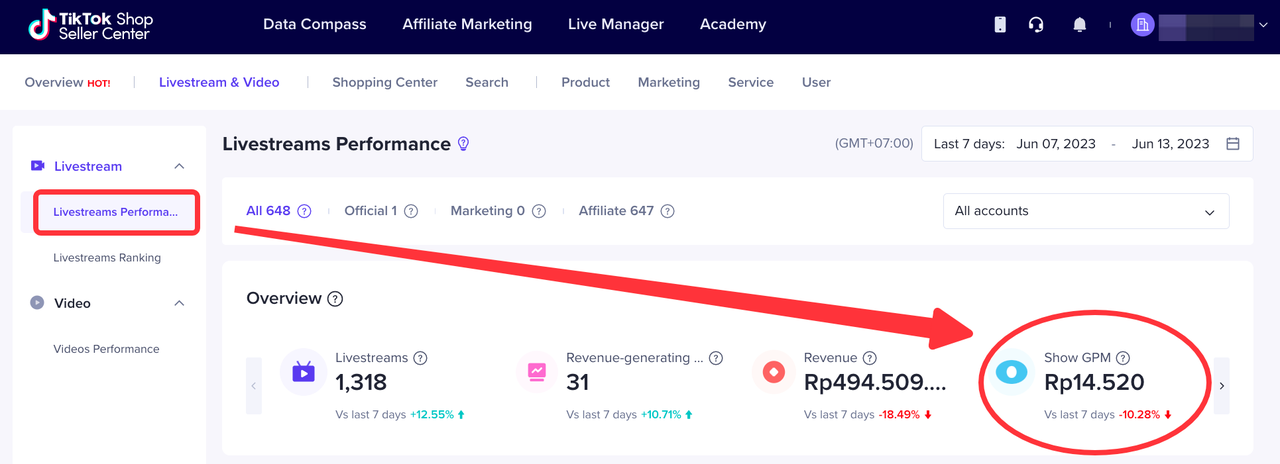
- Livestream & Video > Livestreams Performance > Overview (Show GPM)
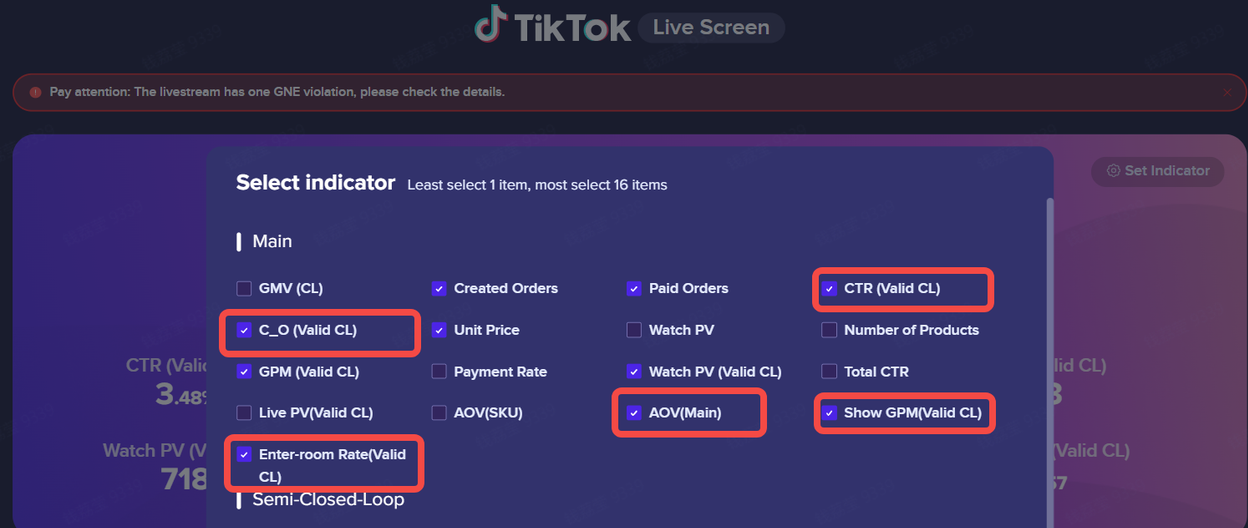
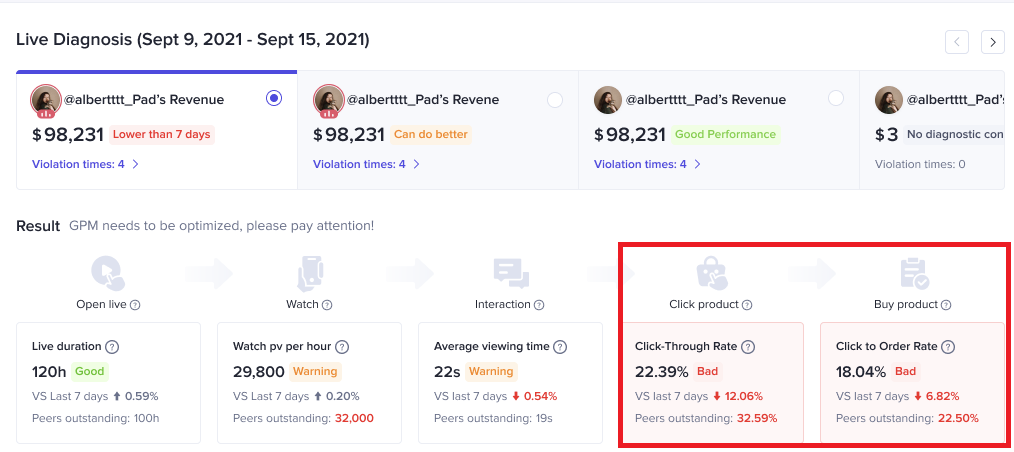
- Livestream & Video > Livestreams Performance > Live Diagnosis (CTR, C_O) with suggestion
- Livestream & Video > Livestreams Performance > Livestreams (Show GPM, ERR,CTR,CO,AOV)