

TikTok Shop E-Invoice Implementation
Introduction
What is Happening?
The Malaysian government is implementing mandatory e-invoicing as part of its tax digitalization strategy by the Inland Revenue Board of Malaysia (LHDN).The deadline has been extended to July 1, 2026, TikTok Shop will implement the e-invoice framework on its platform. Sellers must submit the required information from the end of May, 2026 onwards. Non-compliance may result in enforcement actions, including wallet withdrawal freezes.
Why Does This Matter for E-Commerce Sellers?
Based on the E-invoice Guidelines issued by LHDN, TikTok Shop is required to issue e-invoices to sellers for transactions conducted on the platform. These e-invoices serve as official documentation of income for sellers, helping them to maintain accurate financial records and ensure proper income reporting to LHDN for tax compliance purposes.💡 For more information, please refer to LHDN website (link)
Key Deadlines and Compliance Timeline
As TikTok Shop will implement the e-Invoice requirements from 1 July 2026 onwards, all TikTok Shop sellers shall submit all the required information before that, failing which, TikTok Shop will take enforcement actions.‼️ Failure to submit and obtain approval by the specified deadline will result in enforcement actions, such as freezing the seller's wallet withdrawal function.
What Sellers Need to Submit/Prepare
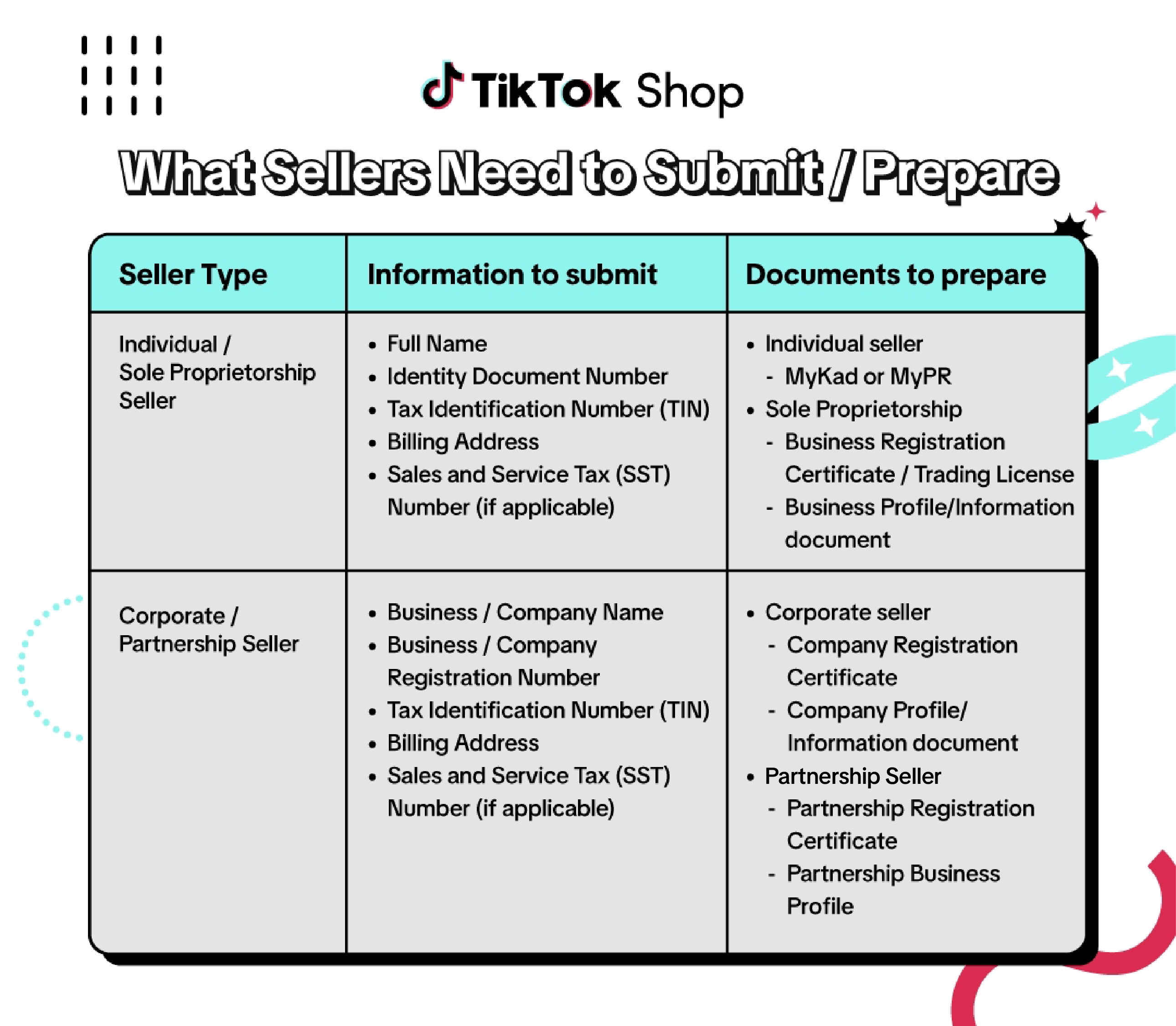 Note:
- The Business Registration Certification must be valid at the time of submission.
- The SSM Business Profile/Information document must be dated within the last 12 months prior to submission.
- To find out more information about SSM registration for Sole Proprietorship, please refer to this article (link)
How to submit my Tax Identification Number in Seller Center
- [For Existing Sellers] Seller can go to Seller Qualification Center to update the TIN. Please refer to this feature guide for more info
- [For New Sellers] On Seller Center PC, under My Account
- Go to TikTok Shop Seller Center > My Account > Account Settings > Taxes

- Go to TikTok Shop Seller Center > My Account > Account Settings > Taxes
- On Taxes page, click Update
- in the following pop up, fill in your TIN number and relevent field. Then click Submit
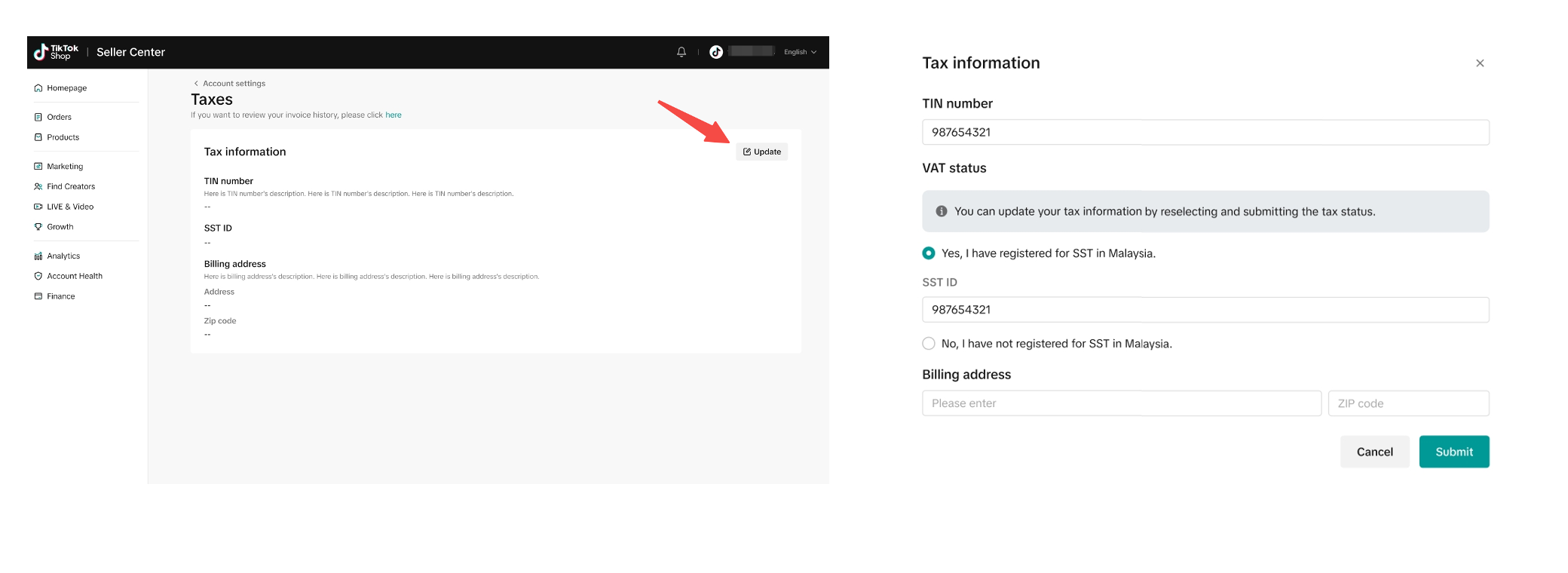
- Existing sellers will also see a banner in their Taxes page informing them to provide their tax information. Clicking "Go to qualification center" will take sellers to the Qualification Center, where they can complete their tax information submission, alongside business/personal identification information.

- The collection of information in Qualification Center will be done in batches starting May 29th and until no later than June 30th.
- Sellers in the current batch will see a "Verify qualifications" banner in the Qualification Center, clicking which will start the information submission process.
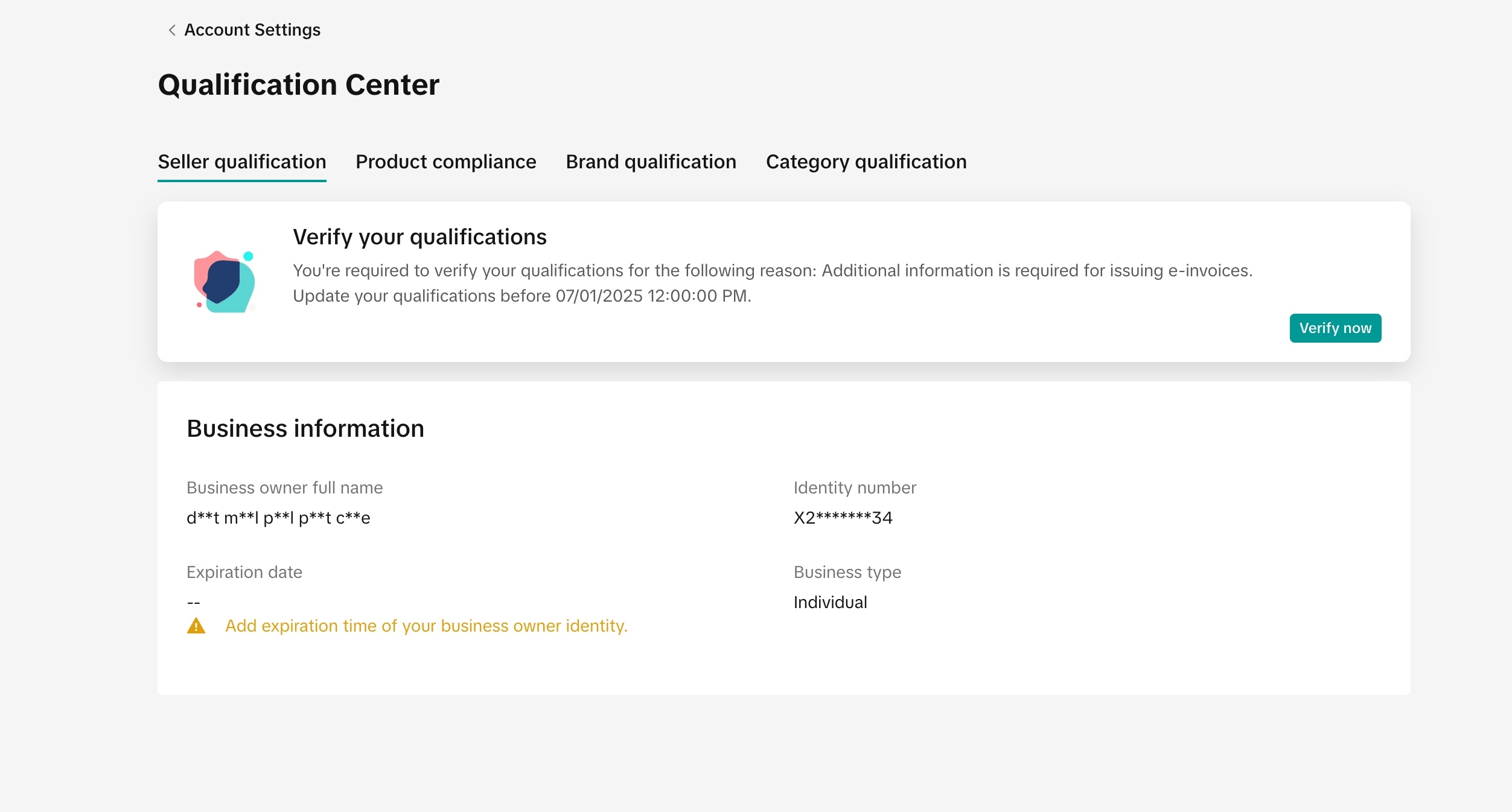
- If sellers do not see the "Verify qualifications" banner, they are likely in a future batch. Therefore, it is of sellers' best interest to check the Taxes page and the Qualification Center frequently to be informed when to update their tax information.
Corporate sellers | Individual sellers |
|
|

Check Verification Status
Sellers' information will need to be verified. Sellers may check their verification status during their shop set-up. They may also check the verification on the Account Settings page > Taxes, or Account Settings page > Qualification Center.There are three review statuses. Sellers need to keep track of their review status and provide updated information if needed until the review is successful.
Review Status | Explanation | Display on Shop Setup page | ||
| Review in progress | Tax information is being reviewed. Sellers should check regularly to make sure their tax information is valid. |  |  |  |
| Review success | Tax information has been verified. No further action is needed. |  |  | |
| Review failed | Tax information could not be verified. Sellers need to update their information and go through another review. |  |  |  |

What happens if Sellers do not provide Tax Information or Tax Information is not Verified?
Sellers who do not provide their tax information, or whose tax information is not successfully verified, will be blocked from withdrawing from the platform starting July 1st, 2026.The platform cannot advise on tax matters. For further questions on tax issues, please consult with an tax advisor, Tax Authority help center services, or visit the Tax Authority website.
Frequently Asked Questions (FAQs)
💡 For more information & FAQ, please refer to LHDN website (link)
- What is an e-Invoice and why do I need to do this?
- How do I find my TIN?
- How should I input my TIN number?
Type of Seller | TIN Format | Important Notes |
Individual* | IG + 9-11 digits | Example: IG57303584070 |
Sole Proprietor | IG + 9-11 digits | Example: IG57303584070 |
Company (Corporate) | C/D +9-11 digits | Example: C20830570210 |
- Digits must not start with 0 | ||
- TIN must end with 0 | ||
| - If TIN starts with 0 after the prefix, remove the 0. Example: C01234567890 → C1234567890 | ||
- If TIN doesn’t end with 0, add a 0 at the end. Example: C123456789 → C1234567890 |
- For individual sellers, current TIN format begins with "IG." Previously, before 2nd January 2023, it started with "OG" or "SG."
 B. Corporate

- What will happen if I do not submit the required information before the deadline?
- A seller who is registered as partnership, how should they proceed with the TIN verification?
General Partnership/Fix term partnership/Limited Liability Partnership (LLP) | |
| TTS Entity Type | Corporate |
| TIN format | 1/2 alphabets + 9-11 digits Example:
|
| Document required | General Partnership:
|